

Mariana
Members
-
Joined
-
Last visited
Never
-
Yes he is too cool, like the animation For the topic, you can try: https://www.woorank.com/fr/ Also this website : https://search.google.com/test/mobile-friendly the problem of the most test website is the first page is analysed. Metaforensic is great for that, you have a nice view of your website.
-
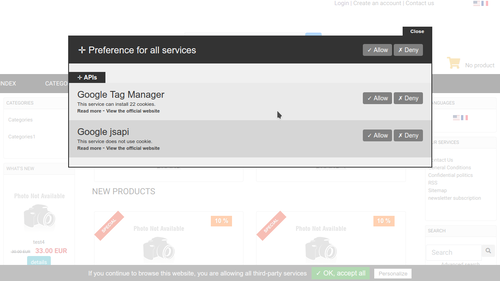 This modules is perfect to include if you have en European business or sell in Europe. You can manage several tag as Google Analytics ... I recommend to follow the development evolution on the website tarteauxcitrons or on Github. The ClicShopping modules update is more low on the community development.
 -
v 3.213 is released, I started to use it and seems to work well on php 7.4 . The feature on the table are interesting, also in stats, it's possible to download the data in different mode csv, json ..
-
Mariana changed their profile photo
-
Just a question, Is possible to do that with ClicShopping a concret example . https://bootsnipp.com/snippets/O5yMd
-
I'm doing a lot of mailing. I use Mailchimp, which I can not recommend (but I have no action at home!). After all, it's all about targeting, content and frequency! The mailing, it works, but must do it properly! (like everything!)
-
The facebook marketplace has a very good reach locally and growing. Also can do very targeted ads if you like. I'm not a big fan of groups unless you can somehow get a ton of followers who are very passionate about the same thing together.
-
I started to compare the files, lot of change have been made. A simple test quickly and seems to works good. As newbie, I can just test the backoffice and the shop.
-
You can optimize your image also, some tools can help you for that : https://bulkresizephotos.com/
-
Thank you for your time and effort, I will test this new version
-
Is it a menu, in this case, you can use the page manager inside the application to make that ?
-
Hello, I saw this menu, is a just an archive or there is a specific function. Curious to know the approach.
-
Hello, Than you to share our experience @Drack, Is possible to make an effect on the product when the mouse is on the product. Some website has this approach. This is my first post, I have just installed the solution. Thank you.
