

Drack
Members
-
Joined
-
Last visited
Everything posted by Drack
-
Hello @FrediKa , Welcome, ClicShopping is new platform, the forum has just started. You have some documentation included inside the forum or inside the blog, do no hesitate to read, it will help you. To start look this. installation process : https://www.clicshopping.org/forum/blogs/entry/4-clicshopping-installation-process/ secure : https://www.clicshopping.org/forum/blogs/entry/5-secure-clicshopping/ Do not hesitate to ask a question, someone will help you.
-
Do you use the same image format or it's different ?
-
@ClicShopping, Thank you for your help. It's a nice tuto for newbiz
-
Thank you @ClicShopping
-
Hello, I would know if there is something to make on ClicShopping website to explain how to make an Apps ? Thank you
-
-
Exact, it was the problem.
-
Hello, I installed a module, eveything is correct, but when I am looking the shop, the css is not included. What's happen ?
-
Ok thank you
-
I donwloaded some weeks ago ClicShopping, I would know if it's easy to update the solution ?
-
Hello, Do you know the name to include the horizontal menu inside the shop. This menu is displayed on the demo ? Thank you
-
For me it's better to be under linux.
-
Hello @Mathias If I understand well, you have difference e-commerce software. You have more and more visitors You see the reaction time to access at your page in more and more slow Time to think something with more adapted to your needs. but What is you skill for a dedicated server because if you take that, you must have the capacities to configure lot of thing inside. For example at ovh with the kimsufi, but some hoster, can propose you something all included inside dedicated server + cpanel or ispconfig for example. About your migration, I think there is a migrate tool can help you for that.
-
A tool that I did not know http://www.positeo.com/check-duplicate-content/ allows to check which other sites displays similar content for a page. What is acceptable ?
-
Hello Julie, Yes, you can, just remove or comment inside the template $input_quantity
-
I think the best is to have something does'nt lost the customer inside thousand informations. The most important the customer must be focus on what it want and the website must help the customer in this action. The customer must have the best experience. if the user experience is good, he will be interested to come back.
-
-
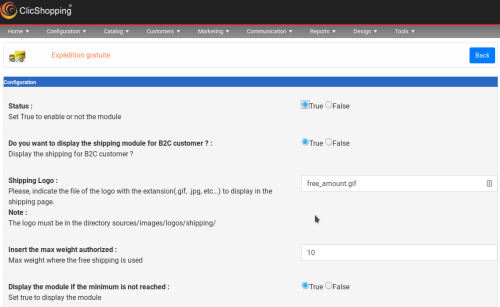 This apps will allow you to display free shipping in function an amount It comes with a hook to display an information in the shopping cart This modules depends of ms_shopping_cart_products_listing for the hooks Important Note : Copy the apps_shipping_free_shipping_amount.json into ClicShopping/Work/Cache/Github licence : GPL 2 - MIT Install : http://monsite/myAdmin/index.php?A&Shipping\FreeShippingAmount Activate the module in ShippingFree
