

Foster
Members
-
Joined
-
Last visited
Never
-
-
-
It's weird, Do you tried on your local computer, because I tested the lastest release and I have no problem. Do you use Cpanel ? If yes you can install via Cpanel ClicShopping, it's automatic. Note . All the script is called on CDN, If you have no connection with internet, you wil have a problem. I suppose it's to reduce the code by the developers, Also, you can try something, Find this function and put in comment these elements, One time I used another software with a lot code line on the same domain and I have been a problem /** * Calculate the size of a directory by iterating its contents * @Access public * @Return size if the directory */ Public Static function getDirSize(): string { /* $path = CLICSHOPPING::getConfig('dir_root', 'Shop'); $path = rtrim(str_replace('\\', '/', $path), '/'); $bytestotal = 0; $path = realpath($path); if ($path !== false && $path != '' && file_exists($path)) { foreach (new \RecursiveIteratorIterator(new \RecursiveDirectoryIterator($path, \FilesystemIterator::SKIP_DOTS)) as $object) { $bytestotal += $object->getSize(); } } */ $bytestotal = ''; return $bytestotal; }
-
-
Hello, Yes congratulation to the team for this new release. The dashboard has a new script, very light and not use jQuery, It's better like that in my sense. Now all the browser can manage some function. The importance of Jquery start to decrease. FontAwesome has been removed also. Now just to have a bootstrap beta 2, I ask me question. It will no better to have the official release ?
-
Hello, I am looking something allowing to check the number of character inside a textarea without jquery. There are some solution, but I like the code below because he is very short. It's for some people want to do create a form as contact, feedback, reviews, comment ... It can be useful If the number of character is not reach, a pop up appear on the screen. <form action="mango.php" method="post" id="form12" onsubmit="var text = document.getElementById('checkField').value; if(text.length < 80) { alert('put more info!'); return false; } return true;"> <textarea rows="10" cols="80" maxlength="200" required id="checkField" > </textarea> </form>
-
hello, If you want something simple and the supplier allow that, it's a good option (as google merchent), else you must use the API.
-
The file config do not stay in 777, but 444. After every hoster has a specific configuration and for moment a software can be simple to use, another with some difficulties. For me, I tested ClicShopping under Ispconfig and Cpanel, ubuntu debian and there is no problem. As mentionned, there, https://www.clicshopping.org/forum/technical-information/ - ClicShopping - ClicShopping has been tested on these environment.
-
Hello, Yes, you can. You must create a hook in ibnside the reviews apps. Lootk this code : SItes/ClicShoppingAdmin ... Dashboard .... main.php <?php echo $CLICSHOPPING_Hooks->output('DashboardShortCut', 'DashboardShortCut', null, 'display'); ?> Now look inside product you will see in Hooks directory a files called DashboardShortCut Reply the process inside Module/ClicShoppingAdmin/DashboardShortCut or inside the aps reviews. I do not explain all because I think you must look to understand the application but you have all the process. good code Regards Forster
-
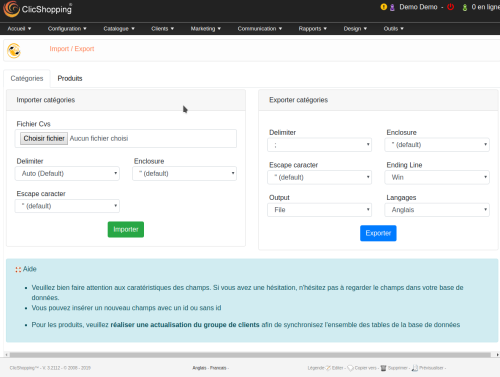 Nice tool can help to win time. The latest release has a quick update bases on model, ean, stock and status. Can be installed via the administration on in manual.
 -
It' s important to respect the copyright, Julie, send you the link, I think it's enough for you to know what you can do or not. We are not administrator, but we can help you in function our knowledge
-
Hello @Robert, Some provider propose let's encrypt as certificate. it's free. Other can propose also paid certificate. If you want to make a secure website for your customer the ssl certificate is necessary. Google look that on your website and also the browser. On local, it's not necessary.
-
Hi @Namiko You will find this option in design / Image management.
-
@Catalina, You can upload and push the files inside your test website. If all is ok, you can push on your production. If you want to know the change, use a tool like beyond compare, you can compare the files and see the update.
-
Hello, It's not so difficult to make an upgrade. I look the update, there 2 sql update. in first, go to your phpmyadmin and update the Db. in second, just send the files in your server. Do not forget it's a pre release, some modification can be made the last minute For you it's good to make a test. That's all. My recommendation before that, do the update in your local server, If your have no problem, go in production. About the module, it will have no problem.

