Search the Community
Showing results for tags 'sitemap'.
Found 4 results
-
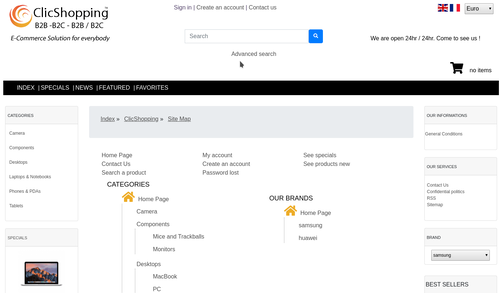
Version 1.0.0
68 downloads
This module will allow you to display a sitemap tree with all brands This module contains - The language files in English and French - The css file in French and English - The module Via the installation system administration ClicShopping Technical Prerequisites: None License : GPL 2 - MIT Modules: - Compatibility: >= version 3.0 - Multi languages Recommendation and documentation specific use : The module is installed in the Default template. If you have another template, you must copy the files inside your new template. Implementation: - Menu design / Miscellaneous - Activate the module - Go to Miscelleanous / sitemap - Go to Communication / Page manager If it not make - create a new page and use external link with this url element : index.php?Info&SiteMap - Copy the modules_sitemap_tree_manufacturers.json into ClicShopping/Work/Cache/Github (manual installation) Github Download Github source : https://github.com/ClicShoppingV3Community/modules_sitemap_tree_manufacturers Github Download : https://github.com/ClicShoppingV3Community/modules_sitemap_tree_manufacturers/archive/master.zip All informations about the ClicShopping Community : https://www.clicshopping.org Software : https://github.com/ClicShopping Official add on : https://github.com/ClicShoppingOfficialModulesV3 Community add on : https://github.com/ClicShoppingV3Community Trademark License info : https://www.clicshopping.org/forum/trademark/Free -
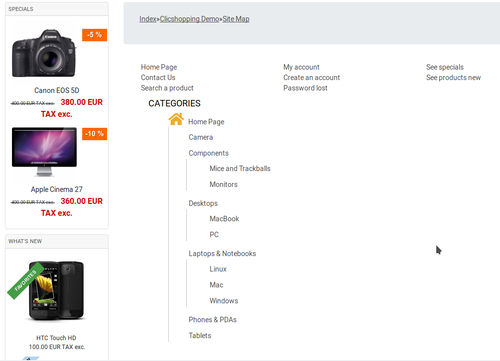
Version 1.0.0
1 download
This module allow you to create sitemap tree with all categories and products This module contains The language files in English and French The css file in French and English The module Via the installation system administration ClicShopping Technical Prerequisites: None License : GPL 2 - MIT Modules: Compatibility: >= version 3.0 Multi languages Recommendation and documentation specific use : The module is installed in the Default template. If you have another template, you must copy the files inside your new template. Implementation: Menu design / Miscellaneous Activate the module Go to Communication / Page manager If it not make create a new page and use external link with this url element : index.php?Info&SiteMap Copy the modules_sitemap_tree.json into ClicShopping/Work/Cache/Github (manual installation) All informations about the ClicShopping Community : https://www.clicshopping.org Software : https://github.com/ClicShopping Official add on : https://github.com/ClicShoppingOfficialModulesV3 Community add on : https://github.com/ClicShoppingV3Community trademark License info : https://www.clicshopping.org/forum/trademark/20.00 EUR -

Version 1.0.0
0 downloads
This module allow you to create sitemap summary with different important link of your website This module contains The language files in English and French The css file in French and English The module Via the installation system administration ClicShopping Technical Prerequisites: None License : GPL 2 - MIT Modules: Compatibility: >= version 3.0 Multi languages Recommendation and documentation specific use : The module is installed in the Default template. If you have another template, you must copy the files inside your new template. Implementation: Menu design / Miscellaneous Activate the module Go to Communication / Page manager If it not make create a new page and use external link with this url element : index.php?Info&SiteMap Copy he modules_sitemap_summary.json into ClicShopping/Work/Cache/Github (manual installation) All informations about the ClicShopping Community : https://www.clicshopping.org Software : https://github.com/ClicShopping Official add on : https://github.com/ClicShoppingOfficialModulesV3 Community add on : https://github.com/ClicShoppingV3Community trademark License info : https://www.clicshopping.org/forum/trademark/Free -
 ClicShopping includes some elements to declare your sitemap on google console. There the main element than you must include in google sitemap. These elements are in relation with these files includes/ClicShopping/Apps/Marketing/SEO/Sites/Shop/Pages/GoogleSitemap/Actions /shop/index.php?Info&RSS /shop/index.php?Sitemap&GoogleSitemapBlogCategories /shop/index.php?Sitemap&GoogleSitemapBlogContent /shop/index.php?Sitemap&GoogleSitemapCategories /shop/index.php?Sitemap&GoogleSitemapFavorites /shop/index.php?Sitemap&GoogleSitemapFeaturedProducts /shop/index.php?Sitemap&GoogleSitemapIndex /shop/index.php?Sitemap&GoogleSitemapManufacturers /shop/index.php?Sitemap&GoogleSitemapPageManager /shop/index.php?Sitemap&GoogleSitemapProducts /shop/index.php?Sitemap&GoogleSitemapSpecials You can also include more sitemap if you want. The approach is modular