Skip to content
View in the app

A better way to browse. Learn more.

Clicshopping AI, Free generative artificial intelligence e-commerce Open Source , Open Source Store Onlne

A full-screen app on your home screen with push notifications, badges and more.

To install this app on iOS and iPadOS
  1. Tap the Share icon in Safari
  2. Scroll the menu and tap Add to Home Screen.
  3. Tap Add in the top-right corner.
To install this app on Android
  1. Tap the 3-dot menu (⋮) in the top-right corner of the browser.
  2. Tap Add to Home screen or Install app.
  3. Confirm by tapping Install.
  • Search By Tags

    Search will match any tag entered
  • Search By Author

Content Type

Forums

  • News and Annoucement
    • Latest news for community
  • ClicShoppingV3
    • Documentation
    • Installation & Configuration & Operation
    • Community Developement
    • Best pratices / tip / trips and training
  • General
    • Optimization / Marketing
    • General discussions
    • Archives

Blogs

  • E-commerce General
  • ClicShopping

Product Groups

  • Ambassador
  • Partnership
  • Hosting plan

Categories

  • Apps
    • Apps Payment
    • Apps Configuration
    • Apps Shipping
    • Apps Catalog
    • Apps Communication
    • Apps Customers
    • Apps Marketing
    • Apps Orders
    • Apps Order Total
    • Apps Report
    • Apps Social Network
    • Apps Tools
    • Apps Web Service
  • Design
  • Template
    • modules_boxes
    • modules_products_info
    • modules_front_page
    • modules_footer
    • modules_header
    • modules_index_categories
    • modules_account_customers
    • modules_products_featured
    • modules_products_heart (favorites)
    • modules_blog
    • modules_blog_content
    • modules_checkout_confirmation
    • modules_checkout_payment
    • modules_checkout_shipping
    • modules_checkout_success
    • modules_tell_a_friend
    • modules_contact_us
    • modules_create_account
    • modules_create_account_pro
    • modules_advanced_search
    • modules_login
    • modules_products_listing
    • modules_products_new
    • modules_products_reviews
    • modules_products_search
    • modules_products_special
    • modules_shopping_cart
    • modules_sitemap
    • Autres modules
  • Hooks
    • Hooks Admin
    • Hooks Shop
  • Languages
  • Modules
    • Modules Export
    • Modules Imports
    • Modules Others
    • Modules Dashboard

Find results in

Find results that contain...

Date Created

  • Start

    End

Last Updated

  • Start

    End


Filter by number of...

  • Minimum number of comments

  • Minimum number of replies

  • Minimum number of reviews

  • Minimum number of views

Found 2 results

    • 3 downloads
    • Version 1.0.1
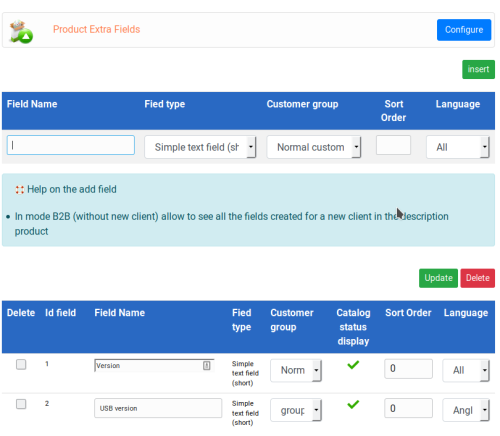
    This apps will allow you to add extra fields inside products. You can choose checkbox, sort fields or long fields. It displays the information inside your product description This module contains - The language files in English and French - The apps Technical Prerequisites: None License : GPL 2 - MIT Modules: - Compatibility: >= version 3.0 - Multi languages Recommendation and documentation specific use : Imlementation Copy the directories into Shop except ModulesInfoJson Copy the apps_extra_fields.json into ClicShopping/Work/Cache/Github Install : http://monsite/myAdmin/index.php?A&Catalog\ExtraFields Activate the module Design/products description
    20.00 EUR
    • 5 downloads
    • Version 1.0.1
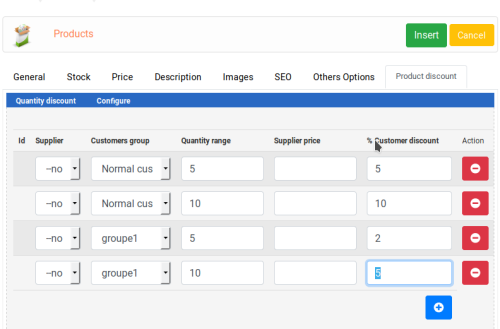
    This apps will allow to manage your quantities discount inside products. A table appears inside the products description with the different discount by quantity An information about all the discount is displayed inside the cart. Important Note : This module contains - The language files in English and French - The css - The apps - The modules Technical Prerequisites: None License : GPL 2 - MIT Modules: - Compatibility: >= version 3.0 - Multi languages Recommendation and documentation specific use : Manual Imlementation The installation is manual and must be downloaded on the marketplace. Copy the QuantityDiscount directory into Apps/Catalog/ directories Copy the apps_quantity_discount.json into ClicShopping/Work/Cache/Github Install : http://monsite/ClicShoppingAdmin/index.php?A&Catalog\QuantityDiscount and after go to insert or edit your products.
    60.00 EUR

Important Information

By using this site, you agree to our Terms of Use

Account

Navigation

Search

Search

Configure browser push notifications

Chrome (Android)
  1. Tap the lock icon next to the address bar.
  2. Tap Permissions → Notifications.
  3. Adjust your preference.
Chrome (Desktop)
  1. Click the padlock icon in the address bar.
  2. Select Site settings.
  3. Find Notifications and adjust your preference.