Skip to content
View in the app

A better way to browse. Learn more.

Clicshopping AI, Free generative artificial intelligence e-commerce Open Source , Open Source Store Onlne

A full-screen app on your home screen with push notifications, badges and more.

To install this app on iOS and iPadOS
  1. Tap the Share icon in Safari
  2. Scroll the menu and tap Add to Home Screen.
  3. Tap Add in the top-right corner.
To install this app on Android
  1. Tap the 3-dot menu (⋮) in the top-right corner of the browser.
  2. Tap Add to Home screen or Install app.
  3. Confirm by tapping Install.

Maxime

Moderators
  • Joined

  • Last visited

Files posted by Maxime

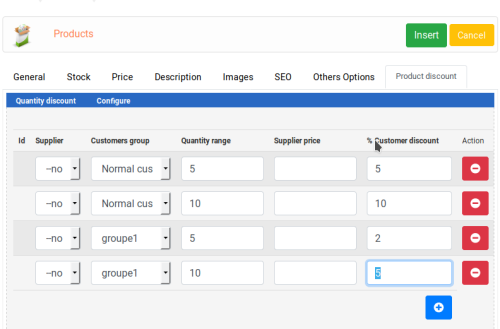
  1. This apps will allow to manage your quantities discount inside products.
     
    A table appears inside the products description with the different discount by quantity
    An information about all the discount is displayed inside the cart.
     
     
    Important Note :
     
    This module contains
     
    - The language files in English and French
    - The css
    - The apps
    - The modules
     
    Technical Prerequisites: None
    License : GPL 2 - MIT
     
    Modules:
    - Compatibility: >= version 3.0
    - Multi languages
     
    Recommendation and documentation specific use :
     
    Manual Imlementation
    The installation is manual and must be downloaded on the marketplace.
    Copy the QuantityDiscount directory into  Apps/Catalog/ directories
    Copy the apps_quantity_discount.json into ClicShopping/Work/Cache/Github
     
    Install :
    http://monsite/ClicShoppingAdmin/index.php?A&Catalog\QuantityDiscount and after go to insert or edit your products.
    • 60.00 EUR
    • 5 Downloads
    Updated

Important Information

By using this site, you agree to our Terms of Use

Account

Navigation

Search

Search

Configure browser push notifications

Chrome (Android)
  1. Tap the lock icon next to the address bar.
  2. Tap Permissions → Notifications.
  3. Adjust your preference.
Chrome (Desktop)
  1. Click the padlock icon in the address bar.
  2. Select Site settings.
  3. Find Notifications and adjust your preference.